The Camera Obscura is a box which is known as being “light-tight” which has a tiny hole pierced at the side. Light rays are squeezed through the hole and from an inverted image on the inside surface. The image is usually depicted in colour. The Camera Obscurer was originally used as a model for the function and structure of an eye. This is related to Pinhole Photography. Pinhole Photography is created from using the camera obscure.


These images show the process of how I made my Camera Obscurer. First I started with the basic template of the box which I glued onto the thicker card. I then used a crafts knife to carefully cut out the box template and fold into the shape of the box. After folding the box together I peeled off the original paper template and painted the inside and outside of the box black. The reason black paint was used is to not interfere or mess up any photographs taken with the Camera Obscurer as light sensitive paper is used. I then used the paper template for the shutter and cut out the same shape on black card. To make the pinhole, a piece of foil was cut from a can 3 by 3 which was then pierced with a hole and glued to the inside of the box.
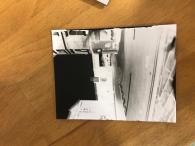
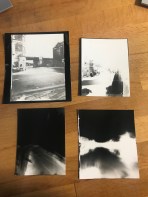
The image above on the left is of the negative photograph produced by my camera obscurer that was made. The image on the right are the positives also made by my camera obscurer. I decided to only make a negative of my best images made from the positives. When taking the positives, I left the shutter originally open for 50 seconds. This timing was too long as when it come to producing the image in the dark room, no detail was showing up on the light sensitive paper of the image I attempted to capture. However, this was just experimenting with the time to see how long to keep the shutter open for as the weather on the day was rather bright. My best attempt of producing the positive was from keeping the shutter open for roughly 30 seconds. This allowed enough light to transfer onto the light sensitive paper and produce the image capturing more detail without the photograph being too overly exposed.


Above is the process of making my original positive photograph taken with my camera obscurer into a negative from using photoshop and doing it digitally. I started by scanning in my photograph to the computer by using the scanner and importing it onto photoshop from importing it from a device. I then selected the image and inverted it which automatically created a new layer, this showing the image to be in a negative version.
In my opinion, the photographs created by my pinhole camera were ver successful as the right time has caused a lot of detail to be shown in the image. It was perfectly exposed.
Health and Safety-
- Make sure that all obstructions are removed from the dark room that could cause any tripping or falling over hazards.
- Gloves need to be worn when washing and developing the photograph to protect your skin from the chemicals.
- Make sure that the chemicals in each tray don’t get mixed up and the correct grabbers are used in each tray also.

 Unit-21 FILM BASED PHOTOGRAPHY